When Should an Agent Generate an Interface?
A decision tree for moving beyond chat answers into forms, timelines, maps, dashboards, voice surfaces, and spatial controls.
Chat is a default, not a law
Most agent systems begin by placing a text box at the bottom of the screen. That is a reasonable starting point because language models are good at language. But it is not always the right interface for the task.
The question is not whether agents should generate UI all the time. They should not. The question is when text becomes a bottleneck and another interface shape would reduce effort, error, or ambiguity.
Start with the user's next action
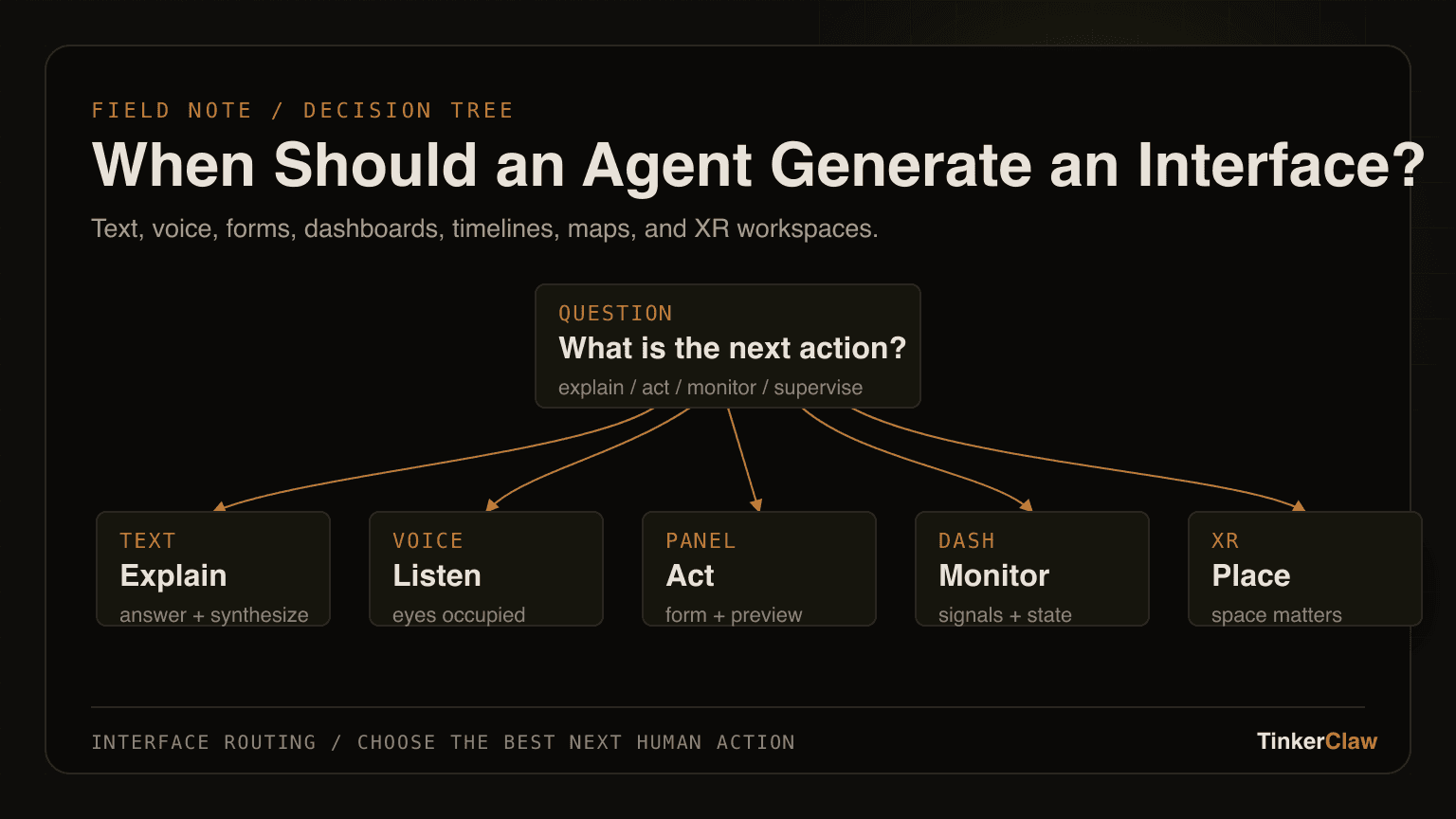
A useful rule: the interface should match what the user needs to do next. If they need an explanation, text may be enough. If they need to compare, a table or matrix is better. If they need to approve steps, a checklist or action preview is better. If they need to monitor changing state, a dashboard or timeline is better.
This shifts the design problem away from novelty. Generated UI is not valuable because it is generated. It is valuable when the generated shape makes the next human action easier.
- Use text for explanation, synthesis, and low-stakes answers.
- Use forms when the agent needs structured missing information.
- Use timelines when order, causality, or history matters.
- Use dashboards when the user must monitor multiple changing signals.
- Use voice when the user's eyes or hands are already occupied.
- Use XR or spatial overlays when place, scale, proximity, or 3D context matters.
Voice is the right interface when looking away matters
Voice should not be treated as a novelty layer on top of chat. It is useful when visual attention is already committed somewhere else. Reading, driving, walking through a space, inspecting a simulation, or working in a headset all create moments where voice can reduce context switching.
The risk is that voice is temporal. Once spoken, the information disappears unless the interface leaves behind a trace. Good voice-based agent interfaces need memory, replay, interruption, and concise visual anchors.
XR is the right interface when space is part of the problem
Mixed reality and XR should not be used just because they look futuristic. They become useful when the agent's output needs to attach to objects, rooms, physical workflows, 3D simulations, or spatial memory.
A generated spatial control panel can be valuable in a vehicle-visibility simulation. It may be wasteful for a simple settings change. The test is whether spatial placement reduces mental translation for the user.
A first decision tree
A simple decision tree can guide future investigations. First ask whether the user needs to act, compare, monitor, learn, or supervise. Then ask which modality is already occupied. Then ask whether the generated interface needs to persist, be auditable, or be shared.
If the answer is mostly explanation, stay with text. If the answer is supervision, generate an action preview. If the answer is hands-free progress, use voice. If the answer is spatial understanding, use XR. If the answer is high-stakes decision support, add evaluation and traceability before adding visual polish.
The future of agent interfaces is not one grand replacement for chat. It is a routing problem: choose the interface shape that gives the human the best next move.